Choose an available quality
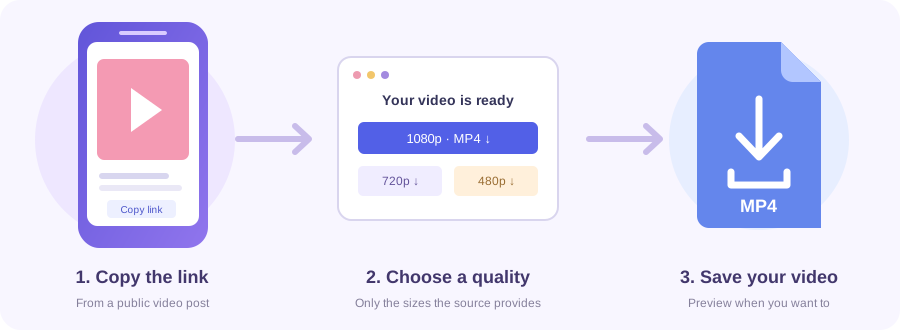
Select from the MP4 resolutions shown. Some posts offer only one.
 Toolsat Once.

Save videos from public Instagram posts. Paste the post link below.
Paste a video link to get started.
Connecting to the video…
Preview unavailable. Try downloading the video.
Open the public video on Instagram and copy its share link.
Paste the link above and choose Get download links.
Choose Download MP4 beside a quality, or Download video for a prepared file. Supported iPhones also offer Save to Photos.
Download a video from a public Instagram feed post using its /p/ link. Reel and older /tv/ video links also work here.
A carousel can contain photos and several videos. This tool returns one video from the post.
Paste the real link copied from Instagram. The codes below are placeholders.
Swipe or scroll sideways to see every column →
| Address or content | Support |
|---|---|
| /p/POST_CODE/ | A feed post containing video; returns one clip. |
| /reel/REEL_CODE/ or /reels/REEL_CODE/ | Accepted here, or use Instagram Reels Downloader. |
| /tv/POST_CODE/ | Older Instagram video links. |
| Profile, Story, hashtag or photo-only post | Not a supported video download. |
Select from the MP4 resolutions shown. Some posts offer only one.
The available download has no audio track, even if you can hear sound in the Instagram app.
Choose Download MP4 to save the video, or Open video to watch it first.
On iPhone, use Save to Photos and choose Save Video if offered. For videos over 25 MB, use Download to Files. On Android or a computer, choose Download MP4 and check Downloads.
Yes, if it contains a video. The tool returns the first available clip, so check the preview. Other slides are not included.
This page accepts feed-post, Reel and older /tv/ video links. The Reels downloader is specifically for /reel/ and /reels/ links.
No. Photo-only posts, Stories and whole-profile downloads are not supported.
That download has no audio track. Music heard in the Instagram app may be unavailable.
No. Private, deleted or restricted posts may be unavailable.
No. Paste the post link and use the tool in your browser.
Choose a quality and tap Download MP4. On iPhone, use Save to Photos or Download to Files.
On supported iPhones, tap Save to Photos and choose Save Video if offered. For videos over 25 MB or unavailable sharing, use Download to Files. If prompted, tap Save to Photos again.